The 5 Best AI Tools for Teachers in 2026
Compiled by AI for My Craft · Last updated · pricing re-verified continuously
TL;DR: The best AI tools for teachers right now are MagicSchool AI, Diffit, Eduaide.ai — full comparison, verified pricing and honest limitations below.
Teachers work more unpaid overtime on writing than almost any profession — lesson plans, differentiated materials, report comments, parent emails, IEP documentation. The AI tools that stick in classrooms are the ones shaped around those exact tasks, not general chatbots that need prompt engineering after a full teaching day.
Everything below has a usable free tier, because we know how this works: you'll pay out of pocket if you pay at all. Prices verified on the date shown.
Find your tool in 10 seconds
1. Your budget?
2. What do you want to solve first?
Quick comparison
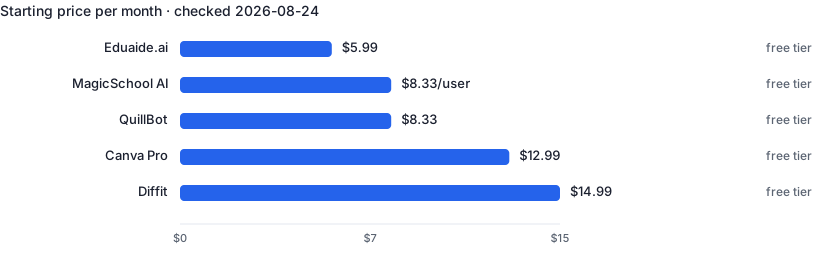
| Tool | Best for | Free tier | Paid from ↕ |
|---|---|---|---|
| MagicSchool AI | Cutting hours of lesson planning and admin writing per week | Yes | $8.33/user/mo |
| Diffit | Differentiating one text for every reading level in your classroom | Yes | $14.99/mo |
| Eduaide.ai | Building complete units, not just one-off resources | Yes | $4.17/mo |
| Canva Pro | Professional-looking marketing materials without a designer | Yes | $12/mo |
| QuillBot | Quick paraphrasing and summarizing without a big subscription | Yes | $8.33/mo |
1. MagicSchool AI — 80+ AI tools built specifically for teachers
MagicSchool wraps AI in teacher-shaped tools: lesson plan generators aligned to standards, rubric builders, IEP goal drafters, behavior-intervention suggestions, report-card comment writers and a student-safe chatbot environment. Because each tool asks for exactly the inputs a teacher has (grade level, standard, topic), output quality beats generic chatbot prompting, and the time savings on administrative writing are substantial.
- Tools mapped to real teacher workflows, not generic prompts
- Standards-aligned lesson and assessment generation
- Student-facing mode with safety guardrails
- Output still requires professional judgment before classroom use
- Some districts restrict AI tool usage — check policy
2. Diffit — Adapt any text to any reading level in seconds
Diffit takes any article, passage or topic and regenerates it at the reading level you choose, complete with vocabulary lists, comprehension questions and summaries. For differentiated instruction — the thing every teacher is told to do and few have time for — it turns an hour of manual adaptation into a minute. Works from URLs, pasted text or just a topic prompt.
- Instant leveled versions of the same content
- Auto-generated vocabulary and comprehension questions
- Exports to editable formats and slides
- Simplified texts occasionally lose nuance
- Question quality varies by subject
3. Eduaide.ai — Lesson planning workspace with 100+ resource generators
Eduaide is a lesson-design workspace: pick a resource type (bell ringer, exit ticket, unit plan, discussion prompts), feed it your topic and standards, and refine the output with built-in feedback tools. It differs from MagicSchool in emphasizing a persistent workspace where generated resources accumulate into full units rather than one-off generations. Teachers who plan whole units at a time tend to prefer it.
- Workspace model suits unit-level planning
- Wide variety of resource types
- Cheapest paid plan in its category
- Interface is busier than single-purpose tools
- Free tier limits are tight for daily use
4. Canva Pro — Design suite with AI image generation, resizing and copy tools
Canva Pro layers AI over the most accessible design tool available: Magic Design generates on-brand social posts and flyers from a prompt, Magic Resize adapts one design to every format, and background removal plus AI image generation handle visuals that used to require a designer. Agents produce listing flyers and social posts in minutes; teachers build worksheets and slides from templates.
- AI features integrated into familiar drag-and-drop editor
- Enormous template library for every profession
- Free for verified K-12 teachers via Canva for Education
- Templates are widely used — brands can look generic
- AI image generation weaker than dedicated generators
5. QuillBot — Paraphrasing, summarizing and grammar tools at a low price
QuillBot started as a paraphraser and has grown into a small suite: rewriting in multiple modes, summarizing long documents, grammar checking and citation generation. Writers use it to rework awkward sentences; teachers use the summarizer to condense readings and the plagiarism checker to spot copied work. It is significantly cheaper than full AI writing platforms while covering the most common editing tasks.
- One of the cheapest paid AI writing tools
- Summarizer handles long documents well
- Multiple paraphrase modes from formal to creative
- Paraphrases can drift from the original meaning
- Not designed for generating content from scratch
Frequently asked questions
Is it OK to use AI for report card comments and IEP drafts?
Drafting, yes — with two hard rules: never paste identifiable student data into tools your district hasn't approved (FERPA risk), and always personalize the draft. Generic AI comments are obvious to parents.
My district blocks AI tools. What are my options?
Ask whether the district has an approved list — MagicSchool and Canva for Education have signed student-privacy agreements many districts accept. Preparing materials at home on your own accounts is typically fine when no student data is involved.
Which tool saves the most time for the least money?
Diffit, if you differentiate texts regularly — it collapses an hour of adaptation into a minute. MagicSchool's free tier is the best overall starting point.
Related guides
Real Estate Agents
5 hand-picked tools · updated 2026-09-10
Freelance Writers
5 hand-picked tools · updated 2026-08-08