The 5 Best AI Tools for Video Creators in 2026
Compiled by AI for My Craft · Last updated · pricing re-verified continuously
TL;DR: The best AI tools for video creators right now are Descript, ElevenLabs, Pictory — full comparison, verified pricing and honest limitations below.
Video production has more AI leverage than any other creative field right now: transcript-based editing, voice cloning, auto-captions and prompt-to-video generation each remove an entire manual stage from the pipeline. A solo creator in 2026 can realistically ship daily content that would have required a small team three years ago.
These five tools each own a different stage: Descript for editing, ElevenLabs for voice, Pictory and InVideo for automated assembly, Submagic for short-form finishing. Prices verified on the date shown.
Find your tool in 10 seconds
1. Your budget?
2. What do you want to solve first?
Quick comparison
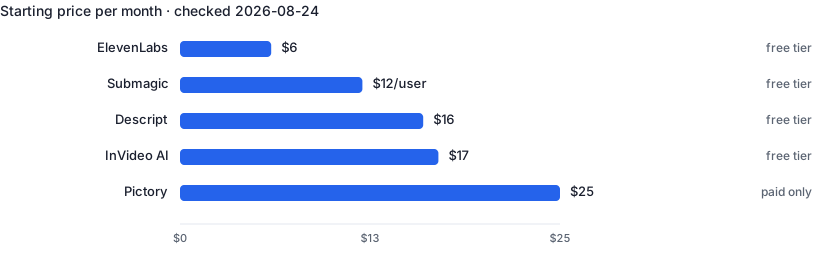
| Tool | Best for | Free tier | Paid from ↕ |
|---|---|---|---|
| Descript | Talking-head videos and podcasts edited at the speed of text | Yes | $16/mo |
| ElevenLabs | Narration and dubbing that doesn't sound robotic | Yes | $6/mo |
| Pictory | Turning text content into social-ready video with zero editing skill | No | $25/mo |
| Submagic | Batch-finishing TikToks, Reels and Shorts with animated captions | Yes | $12/user/mo |
| InVideo AI | Faceless channels producing volume video from prompts | No | $20/user/mo |
1. Descript — Edit video and podcasts by editing the transcript
Descript transcribes your footage and lets you edit the video by deleting words from the text — cutting filler words, silences and mistakes takes minutes instead of hours on a timeline. It adds studio-quality voice enhancement, AI green screen, eye-contact correction and Overdub voice cloning for fixing flubbed lines without re-recording. For talking-head creators and podcasters it replaces a traditional editor for most day-to-day work.
- Text-based editing is dramatically faster for spoken content
- Filler-word removal in one click
- Voice cloning fixes mistakes without re-recording
- Not a replacement for complex multi-track cinematic editing
- Transcription accuracy drops with heavy accents or noise
2. ElevenLabs — The most natural AI text-to-speech and voice cloning
ElevenLabs generates speech that is consistently rated the most human-sounding on the market, with fine control over stability and emotional delivery. Creators use it for faceless-channel narration, multilingual dubbing of existing videos and cloning their own voice to scale content production. The API makes it easy to automate narration pipelines.
- Best-in-class voice realism
- Voice cloning from a short sample
- Dubbing preserves your voice across 30+ languages
- Character quotas make long-form audio costly at scale
- Cloned-voice ethics require care with consent
3. Pictory — Turn scripts and blog posts into stock-footage videos automatically
Pictory takes a script, article URL or long video and automatically assembles a short video: it selects matching stock footage, adds captions, voiceover and music. Quality is 'good enough for social and marketing' rather than cinematic, which is exactly what real estate agents making listing videos or creators repurposing blog content need. No editing skills required at all.
- Fully automatic script-to-video pipeline
- Auto-captions boost silent social viewing
- Repurposes existing blogs and webinars into clips
- Stock-footage look is recognizable
- Limited fine control over timing and transitions
4. Submagic — Viral-style captions and b-roll for short-form video
Submagic specializes in the last mile of short-form content: it generates trendy animated captions, auto-inserts emojis, sound effects, zooms and b-roll suggestions tuned for TikTok, Reels and Shorts. Creators who batch-produce shorts use it to cut per-video finishing time from twenty minutes to two. It is narrower than Descript but faster at the one job it does.
- Caption styles tuned to short-form trends
- Very fast: upload, style, export
- Auto b-roll and sound effects save editing passes
- Only useful for short-form content
- Caption trends age quickly; styles need updating
5. InVideo AI — Prompt-to-video generator with stock media and voiceover
InVideo AI generates complete videos from a text prompt — script, scenes, stock footage, voiceover and music — and lets you edit the result by typing commands like 'make the intro faster'. It targets faceless YouTube channels and marketing teams that need volume over artistry. The command-based editing is genuinely novel and keeps non-editors out of timeline software entirely.
- Full prompt-to-published-video pipeline
- Edit by typing commands, no timeline needed
- Large stock library included
- Generated scripts are formulaic without guidance
- Less control than a traditional editor
Frequently asked questions
Can I build a faceless YouTube channel entirely with these tools?
Technically yes — script with a chatbot, voice with ElevenLabs, assembly with InVideo or Pictory, captions with Submagic. The catch is monetization: since YouTube's mid-2025 inauthentic-content update, mass-produced and templated videos with little added value are ineligible for the Partner Program, so the channels that survive layer in real research, original angles or genuine expertise rather than running the pipeline on autopilot.
Is AI voiceover allowed for monetized YouTube videos?
Yes. YouTube permits synthetic narration, and cloning your own voice for voiceovers or dubs doesn't even trigger its altered-or-synthetic-content disclosure label. That label is for realistic content that could mislead — chiefly making a real person appear to say or do something they didn't, which is where another person's cloned voice would need disclosing — not for narrating your own script. Monetization still depends on the video meeting originality and authenticity policies.
What's the best order to add these to my workflow?
Start with the biggest time sink. For most creators that's editing, which makes Descript the first buy. Short-form-first creators often start with Submagic instead.
Related guides
Real Estate Agents
5 hand-picked tools · updated 2026-09-10
Freelance Writers
5 hand-picked tools · updated 2026-08-08