The 4 Best AI Tools for Wedding Photographers in 2026
Compiled by AI for My Craft · Last updated · pricing re-verified continuously
TL;DR: The best AI tools for wedding photographers right now are Aftershoot, Imagen AI, Evoto — full comparison, verified pricing and honest limitations below.
A wedding leaves you with two to five thousand raw frames and a delivery deadline, and almost none of the work between the shoot and the gallery is creative. It's culling near-duplicates, matching exposure and color across a shifting day, smoothing skin and tidying backgrounds, and doing it all again for the next wedding. This is where AI has changed the economics of a solo photography business: tasks that used to eat a full day per wedding now run in the background while you shoot the next one, at software prices a single shooter can carry.
The four tools below each remove one weekly job — culling, editing, retouching, or the whole post-production chain — and each was chosen because it beats a generic chatbot at a task a chatbot can't touch: it works on your actual RAW files and learns your style rather than inventing one. Every price here was checked on the date shown, and the honest catch with all of them is the same: they get you to a strong first pass fast, but a wedding gallery still needs your eye on the final selects and the edits that carry your name.
Find your tool in 10 seconds
1. Your budget?
2. What do you want to solve first?
Quick comparison
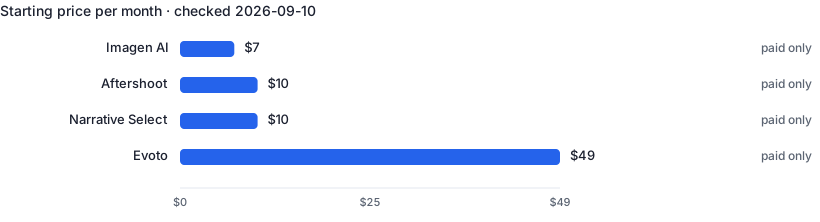
| Tool | Best for | Free tier | Paid from ↕ |
|---|---|---|---|
| Aftershoot | Fast automated culling and end-to-end post-production | No | $10/mo |
| Imagen AI | Consistent color and tone editing that matches your look | No | $7/mo |
| Evoto | Natural skin and portrait retouching across a full gallery | No | $49 |
| Narrative Select | High-volume culling where you keep editorial control | No | $10/mo |
1. Aftershoot — Cull, edit and retouch a full wedding in one app
Aftershoot runs on your computer and culls a full wedding — thousands of RAWs — in under an hour, grouping duplicates, flagging closed eyes and soft focus, and marking your likely keepers for review. Add-on modules edit in a style you train it on and retouch skin, so one app can take you from card to delivery-ready gallery. Pricing is flat with unlimited images and no per-photo fee. Unlike a generic chatbot, it reads your actual RAW files and learns your selection and editing habits, giving you a first pass to refine rather than a blank slate.
- Culls thousands of RAWs in under an hour, offline on your machine
- Flat pricing with unlimited images — no per-photo charges
- One app spans culling, editing and retouching
- Automated picks still need your review — it both over- and under-selects
- Editing and retouching are separate paid modules that add up to the full bundle
2. Imagen AI — Edit a whole wedding in your own trained style
Imagen edits your RAW files in your own style: you build an AI Profile from a few thousand of your past edits, and it then applies your color, exposure and tone across a whole wedding in minutes, straight into Lightroom Classic. It also offers AI culling and per-photo tools for cropping, skin smoothing and masking. Because the profile is trained on your work, results look like you rather than a stock preset — the thing a generic chatbot cannot do. It's built for solo photographers who shoot and edit their own work and want consistency without hand-editing every frame.
- Learns your editing style from past work, not a generic preset
- Edits an entire wedding in minutes, straight into Lightroom Classic
- Pay-as-you-go starts cheap; culling and AI tools built in
- Building an accurate Personal AI Profile needs thousands of your past edits
- Per-photo AI tools and pay-as-you-go add up on high-volume months
3. Evoto — Batch AI portrait retouching you still control
Evoto is an AI retoucher for portraits: it detects faces and skin and applies natural smoothing, blemish and stray-hair removal, teeth and eye work, and body and background adjustments in batch across a gallery, with sliders you control per image. For wedding and portrait shooters it replaces hours of Photoshop frequency-separation work with a first pass you refine. Editing and previewing are free; you spend one credit only when you export a finished image. Unlike a generic chatbot, it works frame by frame on your RAWs and keeps the retouching consistent across a set — the repetitive part done fast.
- Batch retouching that stays natural, with per-image slider control
- You pay only on export — editing and previews are free
- Cuts hours of manual Photoshop skin work per wedding
- Credit model gets expensive if you export very large galleries
- No unlimited plan, and pay-as-you-go credits expire after two years
4. Narrative Select — AI-assisted culling that leaves the final call to you
Narrative is a culling app built for photographers who want speed without handing over the final call. It imports RAWs in seconds, detects every face, scores focus and eye state, groups a shoot into scenes, and ranks frames by sharpness — but you make every selection. A 1-Click AI Editing side applies your style presets on the way to Lightroom, and a separate Publish product turns galleries into blog posts. Unlike a chatbot, it reads your images and surfaces the strongest while keeping the editorial judgment yours — the reason high-volume shooters who distrust fully automated culling reach for it.
- Assesses focus, eyes and scenes but leaves every pick to you
- Imports RAWs in seconds and ships straight to Lightroom
- Unlimited images on every plan; generous free Ultra trial
- Assisted, not automated — you still click through every selection
- An AI preset trained on your own edits is Premium-tier and up
Frequently asked questions
Do I need to tell couples their photos were culled or edited with AI?
There's no legal duty to disclose your post-production tools, and AI culling or color editing is really an extension of the Lightroom presets and batch workflows photographers have used for years — the images are still your photographs. Where it matters is expectation: if you use AI retouching to change how someone looks — slimming, heavy skin work, removing features — that's an editorial choice couples have opinions about, so it's worth a line in your contract or pre-wedding chat about your editing style. Be especially careful with generative tools that add or invent content, which is a different thing from correcting exposure and color.
Is it safe to upload clients' wedding photos to these cloud tools?
For most reputable vendors yes, but read two things first. Check whether your images are used to train the vendor's models and look for an opt-out or a no-training commitment, and check where and how long files are stored. If you photograph clients in the EU or UK, faces are personal data under GDPR, so your contract should cover the processors you use and you should prefer vendors with clear data-handling and deletion terms. Tools that process locally on your machine, or that let you delete projects from their servers after delivery, reduce how much client data sits in the cloud at all.
Does editing with AI affect my copyright in the photos?
Correcting, culling and retouching your own RAW files doesn't change anything — you shot the photograph, so you hold the copyright, exactly as you would after editing in Lightroom. The gray area is purely AI-generated content: in the US and several other jurisdictions, images a machine generates from a text prompt with no human authorship generally can't be copyrighted. That distinction rarely bites a wedding photographer editing real captures, but if you use generative fill to invent large parts of a frame, the invented portion may not enjoy the same protection — a reason to keep generative edits to genuine touch-ups.
Related guides
Real Estate Agents
5 hand-picked tools · updated 2026-09-10
Freelance Writers
5 hand-picked tools · updated 2026-08-08