The 5 Best AI Tools for Bookkeepers in 2026
Compiled by AI for My Craft · Last updated · pricing re-verified continuously
TL;DR: The best AI tools for bookkeepers right now are Dext, Booke AI, Uncat — full comparison, verified pricing and honest limitations below.
Bookkeeping is a monthly rhythm of the same tasks — chasing and keying receipts, categorizing bank-feed transactions, reconciling accounts, and going back and forth with clients over the entries nobody can identify. Each of these is repetitive, rules-based and high-volume, which is exactly where AI now saves hours: data capture that reads a receipt in seconds, categorization that learns your chart of accounts, and client-query tools that turn 'what was this $340 charge?' into a single message instead of an email thread.
We picked the five tools below on one test: each removes a task a bookkeeper does every week, at a price a solo practice or small firm can justify. Every price on this page was checked on the date shown, and where a tool bills per client we say so — that math matters more than a headline rate once you carry twenty clients. None of these replace your judgment on the books; they clear the manual work so the review is all that's left.
Find your tool in 10 seconds
1. Your budget?
2. What do you want to solve first?
Quick comparison
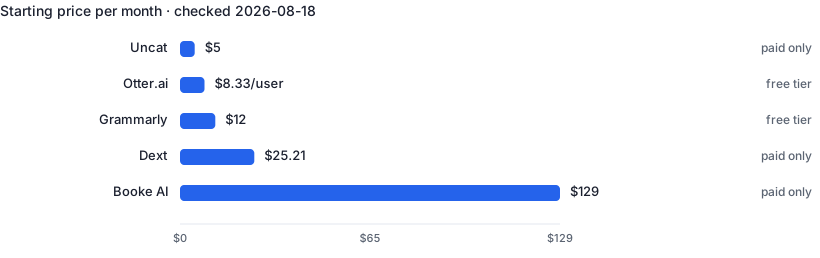
| Tool | Best for | Free tier | Paid from ↕ |
|---|---|---|---|
| Dext | Automating receipt and invoice data entry into your accounting software | No | $25.21/mo |
| Booke AI | Automating daily categorization, reconciliation and client queries | No | $129/mo |
| Uncat | Getting clients to clear uncategorized transactions without email chains | No | $5/mo per client |
| Otter.ai | Never taking manual notes in interviews, calls or showings again | Yes | $8.33/user/mo |
| Grammarly | Error-free client-facing communication with zero workflow change | Yes | $12/mo |
1. Dext — Capture receipts and invoices and sync clean data to your books
Dext (formerly Receipt Bank) reads receipts, invoices and statements submitted by photo, email or upload, extracts the supplier, tax and line-item data, and pushes it into QuickBooks, Xero or Sage — no manual keying. Bookkeepers use it to kill the monthly data-entry pile and to get clients submitting documents as they go instead of in a shoebox at year-end. Unlike a generic AI, it is built to sit inside an accounting workflow, keeps the original document for the audit trail, and stores scans for years.
- Extracts data from documents with very high accuracy, cutting manual entry
- Clients can submit receipts by phone app or email as they go
- Keeps original document scans for a durable audit trail
- No free tier — only a 14-day trial, and document caps push heavy months to higher plans
- Overkill and pricey if you only process a handful of documents a month
2. Booke AI — Auto-categorize transactions and reconcile inside QuickBooks and Xero
Booke AI works on top of QuickBooks Online and Xero, categorizing bank-feed transactions, matching receipts and invoices to entries, and flagging inconsistencies ahead of month-end close. Its client-query tool turns unknown transactions into one-click questions clients answer without a phone call, and an email-to-task feature converts client messages into tracked work. Bookkeepers use it to shrink the daily categorization grind and the back-and-forth that stalls a close. Unlike a general chatbot, it is wired into your ledger and proposes entries you approve rather than free-form text.
- Sits inside QuickBooks and Xero — no new ledger to learn
- Client-query tool resolves unknown transactions without phone tag
- Flags inconsistencies and builds an audit trail for month-end close
- At $129 per business/month, single small clients are hard to justify without firm pricing
- Automation still needs review — it proposes entries, it doesn't remove sign-off
3. Uncat — Resolve uncategorized transactions with clients in one place
Uncat syncs the uncategorized transactions from a client's QuickBooks or Xero into a simple shared list, then lets the client add the missing category, memo and receipt themselves — pushing the answers back to the books automatically. Bookkeepers use it to end the email chains and spreadsheet chases that hold up every close, replacing 'what was this charge?' with a link the client fills in. It does one narrow job that a general AI can't touch: closing the loop with the client on the entries only they can explain.
- Clients categorize their own unknown transactions, syncing straight to QuickBooks/Xero
- Cheap per-client rate with unlimited users and transactions
- Kills the email-and-spreadsheet chase that delays every close
- Solves only the uncategorized-transaction problem — not a full bookkeeping tool
- Per-client billing adds up across a large client roster
4. Otter.ai — Automatic meeting notes, summaries and action items
Otter joins your calls or records in-person conversations, transcribes them live, and produces summaries with action items. Recruiters use it to stay present in interviews instead of typing notes; agents use it to capture buyer requirements during showings and calls. The searchable archive means 'what did they say about budget?' takes seconds to answer weeks later.
- Live transcription with speaker identification
- Auto-generated summaries and action items
- Searchable archive of every conversation
- Accuracy drops with crosstalk and jargon
- Recording consent laws vary — always ask
5. Grammarly — Grammar, tone and clarity checking everywhere you type
Grammarly sits on top of whatever you already write in — email, docs, ATS forms, browsers — and flags grammar, clarity and tone issues in real time. The Pro tier adds full-sentence rewrites, tone adjustment and generative drafting. For professionals whose credibility depends on polished client-facing writing, it is the lowest-friction AI tool on this list: install once, benefit in every text field.
- Works inside the tools you already use
- Excellent free tier for basic correctness
- Tone detection helps calibrate sensitive emails
- Suggestions can flatten a distinctive writing voice
- Generative features are weaker than dedicated AI writers
Frequently asked questions
Does using AI bookkeeping tools change my responsibility for the accuracy of the books?
No — you remain responsible. Auto-categorization and receipt capture are fast, but they guess, and a misfiled transaction is still your error to catch. Treat AI output as a first pass to review, not a finished ledger, and keep the audit trail — original documents, who approved what — that these tools store. If you sign off on financials or file on a client's behalf, the accountability is yours regardless of what suggested the entry.
Is it safe to connect these tools to a client's QuickBooks or Xero and upload their financial data?
Generally yes with reputable vendors, but check two things: the vendor's security posture — encryption, SOC 2 or equivalent, and whether your data trains their models — and your engagement terms. Bookkeepers hold sensitive financial and personal data, so look for zero-training commitments and named subprocessors. Get client consent where your agreement or privacy law requires it, and prefer per-client access controls over one shared login.
Can AI categorize transactions well enough to skip manual review?
Not yet, and skipping review is where firms get burned. Modern tools categorize routine, recurring transactions with high accuracy once they've learned your rules, but they still miscode ambiguous items, one-offs and anything needing context they don't have — owner draws versus wages, capital versus expense, personal spend on a business card. The realistic gain is that AI handles the obvious majority so your time goes to the slice that needs a human. Uncategorized-transaction tools exist precisely because that last slice always does.
Related guides
Recruiters & HR
4 hand-picked tools · updated 2026-09-24
Paralegals & Legal Assistants
5 hand-picked tools · updated 2026-07-26