The 5 Best AI Tools for Paralegals in 2026
Compiled by AI for My Craft · Last updated · pricing re-verified continuously
TL;DR: The best AI tools for paralegals & legal assistants right now are Humata AI, Genie AI, Gavel — full comparison, verified pricing and honest limitations below.
Paralegal work is document work — reviewing record productions, drafting discovery and routine forms, transcribing intake calls, and proofreading correspondence that goes out under an attorney's name. These are exactly the repetitive, high-volume tasks AI now handles well, and the tools below bring capabilities that used to require expensive litigation platforms down to prices a solo practice or small firm can self-serve.
One boundary to keep in view: paralegals cannot give legal advice, and none of these tools change that — every output still runs through a supervising attorney. Client confidentiality also travels with your data, so the wrong tool is worse than none. The picks here are chosen because they ground their work in your documents or vetted templates rather than free-form generation, which makes them both safer and easier to verify than a generic chatbot.
Find your tool in 10 seconds
1. Your budget?
2. What do you want to solve first?
Quick comparison
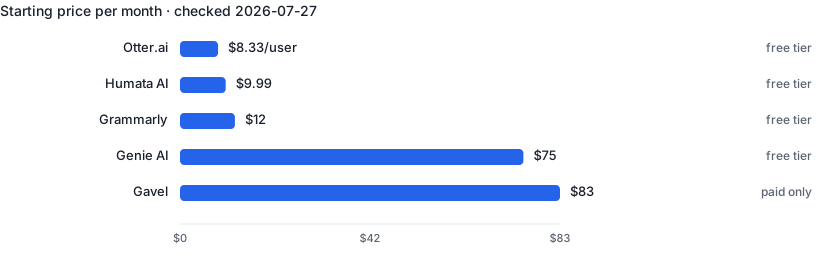
| Tool | Best for | Free tier | Paid from ↕ |
|---|---|---|---|
| Humata AI | Summarizing and searching long case files and record productions | Yes | $9.99/mo |
| Genie AI | First-draft contracts and clause-level review before attorney sign-off | Yes | $59/mo |
| Gavel | Automating repeat documents and turning intake data into drafts | No | $83/mo |
| Otter.ai | Never taking manual notes in interviews, calls or showings again | Yes | $8.33/user/mo |
| Grammarly | Error-free client-facing communication with zero workflow change | Yes | $12/mo |
1. Humata AI — Ask questions across long case files and get cited answers
Humata ingests PDFs — contracts, depositions, medical records, discovery productions — and answers plain-language questions with citations that point to the exact page. Paralegals use it to summarize hundred-page records, locate a single clause across a document set, or build a first-pass chronology in minutes instead of hours of manual review. Unlike a generic chatbot, it works over the files you upload and grounds every answer in the source, so verifying what it tells you takes seconds.
- Every answer cites the source page for fast verification
- Handles very long documents a general chatbot can't hold
- Free tier and cheap Expert plan work for solo use
- Page-based limits mean heavy review months cost extra
- OCR is Team-tier only — scanned exhibits need clean text first
2. Genie AI — Draft, review and redline contracts from 500+ templates
Genie AI drafts, reviews and redlines contracts in a Word-style editor backed by a library of 500+ templates. Paralegals use it to produce a first-draft NDA, service agreement or engagement letter, flag risky clauses, and mark up a counter-party's contract before the attorney reviews it. Because it builds on vetted templates rather than free-form generation, output stays closer to enforceable structure, and the free plan covers drafting and Q&A so you can test it on real documents first.
- 500+ templates grounded in real contract structures
- Redlines and answers questions on counter-party documents
- Free plan lets you trial drafting before paying
- Exports are locked until you upgrade to a paid plan
- Wide multi-jurisdiction coverage sits on the pricier Enterprise tier
3. Gavel — Turn client intake into finished documents automatically
Gavel (formerly Documate) converts a firm's repeat documents — wills, retainer agreements, court forms, demand letters — into automated templates: build the questionnaire once, and intake answers populate a finished draft. Paralegals use it to kill the copy-paste-and-find-replace ritual across near-identical documents and to standardize output across a practice. It integrates with Clio and handles both Word and fillable PDFs, so the generated file matches what the firm already files.
- Eliminates copy-paste errors on repetitive document sets
- Clio, Word and fillable-PDF support fit existing workflows
- Client-facing intake forms cut the back-and-forth
- Lite caps you at 10 templates — active libraries outgrow it
- No permanent free tier, only a 7-day trial
4. Otter.ai — Automatic meeting notes, summaries and action items
Otter joins your calls or records in-person conversations, transcribes them live, and produces summaries with action items. Recruiters use it to stay present in interviews instead of typing notes; agents use it to capture buyer requirements during showings and calls. The searchable archive means 'what did they say about budget?' takes seconds to answer weeks later.
- Live transcription with speaker identification
- Auto-generated summaries and action items
- Searchable archive of every conversation
- Accuracy drops with crosstalk and jargon
- Recording consent laws vary — always ask
5. Grammarly — Grammar, tone and clarity checking everywhere you type
Grammarly sits on top of whatever you already write in — email, docs, ATS forms, browsers — and flags grammar, clarity and tone issues in real time. The Pro tier adds full-sentence rewrites, tone adjustment and generative drafting. For professionals whose credibility depends on polished client-facing writing, it is the lowest-friction AI tool on this list: install once, benefit in every text field.
- Works inside the tools you already use
- Excellent free tier for basic correctness
- Tone detection helps calibrate sensitive emails
- Suggestions can flatten a distinctive writing voice
- Generative features are weaker than dedicated AI writers
Frequently asked questions
Can paralegals use AI without crossing into unauthorized practice of law (UPL)?
Yes, when it stays support work. AI can summarize records, draft from templates and organize documents, but the legal judgment — what to file, what advice to give — has to come from a supervising attorney who reviews the output. UPL problems arise when AI-generated answers reach a client as legal advice without that review, so keep an attorney in the loop on anything substantive.
Is it safe to upload confidential client documents to these tools?
Only after checking the vendor's terms. Your duty of confidentiality extends to the services you use, so look for zero-training / zero-retention commitments, encryption and ideally SOC 2, and get client consent where your jurisdiction or engagement requires it. Avoid pasting privileged material into free consumer chatbots that may train on inputs — the tools here are chosen partly because they offer business-grade data handling.
Will a court accept AI-assisted filings?
The court cares about the document, not how you drafted it — but you are fully responsible for its accuracy. Every citation, quote and factual claim must be verified against the source, because AI can fabricate plausible-looking cases, and lawyers have been sanctioned for filing them. Use these tools to draft and organize, then check everything before it goes out.
Related guides
Recruiters & HR
4 hand-picked tools · updated 2026-07-26
Bookkeepers
5 hand-picked tools · updated 2026-08-05